



0024. undefined 类型和 null 类型
- 1. 🎯 本节内容
- 2. 🫧 评价
- 3. 🤔 什么是 undefined 和 null 类型?
- 4. 🤔 undefined 和 null 在 TypeScript 中是类型还是值?
- 5. 🤔 strictNullChecks 选项对 null 和 undefined 有什么影响?
- 6. 🤔 在实际开发中如何使用 null 和 undefined?
- 7. 🤔 如何处理嵌套对象中的 null 和 undefined 值?
- 8. 🤔 什么是非空断言操作符
!? - 9. 🤔 使用非空断言操作符
!有什么风险? - 10. 🔗 引用
1. 🎯 本节内容
undefinednull- 非空断言操作符
! - 明确赋值断言(definite assignment assertion)
2. 🫧 评价
- undefined 和 null 是两个比较特殊的类型,从某种程度上说,这是 JS 设计上的缺陷,因此在 TS 中,对它们俩的处理,会涉及到比较多的细节。
下面是根据本节内容整理的处理 null 和 undefined 的一些建议:
- 始终开启
strictNullChecks配置。 - 遇到
null或undefined时,能用?.和??解决的,就不要用!。只有在你比 TypeScript 更了解运行时状态,且愿意承担风险时,才使用!。
| 解决方案 | 适用场景 | 安全性 | 推荐度 |
|---|---|---|---|
可选链 ?. | 访问可能为空的嵌套属性 | ⭐⭐⭐⭐⭐ | ✅✅✅ 强烈推荐 |
空值合并 ?? | 提供默认值 | ⭐⭐⭐⭐⭐ | ✅✅✅ |
类型守卫 if | 需要复杂逻辑判断 | ⭐⭐⭐⭐ | ✅✅ |
非空断言 ! | 你 100% 确定值存在(如 DOM 查询、初始化后) | ⭐ | ⚠️ 谨慎使用 |
明确赋值断言 !: T | 类属性延迟初始化 | ⭐⭐ | ⚠️ 仅在框架中使用 |
3. 🤔 什么是 undefined 和 null 类型?
在 TypeScript 中,null 和 undefined 是两个特殊的原始类型,它们在 JavaScript 中也存在,但在 TypeScript 中有更严格的类型检查机制。
- undefined 表示“未定义”或“尚未赋值”的状态
- 在 JavaScript 中,当你声明一个变量但没有初始化它时,它的默认值就是
undefined - 函数没有显式返回值时,也会返回
undefined
let a: number
console.log(a) // undefined

// 注意:如果启用了 strict 模式,TypeScript 会报错!
// 开启 strictNullChecks 配置的情况下,会报错:
// Variable 'a' is used before being assigned.(2454)- null 表示“有意的空值”(intentional absence of any object value)
- 通常用于表示一个变量“当前没有值”,但将来可能会有
- 在 JavaScript 中,
null是一个字面量,类型为object(这是历史 bug),但在 TypeScript 中它有自己的类型null
let b: string | null = null4. 🤔 undefined 和 null 在 TypeScript 中是类型还是值?
在 TypeScript 中,null 和 undefined 是独立的类型,但 null 和 undefined 也可以表示独立的值。
- 类型
undefined只有一个值:undefined - 类型
null只有一个值:null
// 这意味着你可以这样写:
let u: undefined = undefined
let n: null = null

// 但通常不建议单独使用 undefined 或 undefined 作为变量类型,因为它们表达能力有限。
// 更常见的是将它们作为联合类型的一部分:
let maybeString: string | null = null
let maybeNumber: number | undefined = undefined- 值得注意的是,作为值,它们有一个特殊的地方:任何其他类型的变量都可以被赋值为
undefined或null。
let age: number = 24

age = null // 正确
age = undefined // 正确

// 如果开启 strictNullChecks 会报错:
// Type 'null' is not assignable to type 'number'.(2322)上面代码中,变量 age 的类型是 number,但是赋值为 null 或 undefined 并不报错。
这并不是因为 undefined 和 null 包含在 number 类型里面,而是故意这样设计,任何类型的变量都可以赋值为 undefined 和 null,以便跟 JavaScript 的行为保持一致。
JavaScript 的行为是,变量如果等于 undefined 就表示还没有赋值,如果等于 null 就表示值为空。所以,TypeScript 就允许了任何类型的变量都可以赋值为这两个值。
5. 🤔 strictNullChecks 选项对 null 和 undefined 有什么影响?
TypeScript 对 null 和 undefined 的处理,在是否启用 strictNullChecks 编译选项时完全不同。
5.1. 未启用 strictNullChecks
null和undefined可以赋值给任何类型(除了never)- 这和 JavaScript 行为一致,但容易导致运行时错误
// tsconfig.json 中 strictNullChecks: false
let foo: string = null // ✅ 允许!但危险5.2. 启用 strictNullChecks(推荐!)
null和undefined不能赋值给其他类型(如string、number等),除非显式声明为联合类型- 这能帮助你在编译期捕获空值错误
// tsconfig.json 中 strictNullChecks: true
let foo: string = null // ❌ 错误!
// Type 'null' is not assignable to type 'string'.(2322)

let bar: string | null = null // ✅ 正确- 建议始终启用
strict: true(它包含strictNullChecks),这是现代 TypeScript 项目的最佳实践。 - 打开
strictNullChecks以后,undefined和null只能赋值给自身,或者any类型和unknown类型的变量。
6. 🤔 在实际开发中如何使用 null 和 undefined?
如果某个值可能会是空值,那么就可能需要用到 null 和 undefined。
下面是一些常见的场景:
// 可选属性或参数
function greet(name?: string) {
  // name 的类型是 string | undefined
  if (name) {
    console.log('Hello, ' + name)
  } else {
    console.log('Hello, stranger')
  }
}

greet() // name 为 undefined// API 返回可能为空的数据
interface User {
id: number
name: string
}
function findUser(id: number): User | null {
// 模拟查找
return id === 1 ? { id: 1, name: 'Alice' } : null
}
const user = findUser(2)
if (user !== null) {
console.log(user.name) // 安全访问
}// 初始化状态
class DataService {
private data: string[] | null = null
async loadData() {
this.data = await fetchSomeData()
}
getData() {
if (this.data === null) {
throw new Error('Data not loaded yet')
}
return this.data
}
}// DOM 操作中的类型安全处理
function setupEventListeners() {
// 可能找不到元素的情况
const button = document.getElementById('submit-button')
const input = document.querySelector<HTMLInputElement>('.user-input')
// input、button 会被自动推断为 HTMLElement | null 类型
// 表示查询的节点可能不存在
// 安全地添加事件监听器
if (button != null) {
button.addEventListener('click', handleSubmit)
}
// 处理可能为 null 的输入元素
if (input?.value != null && input.value.trim() !== '') {
console.log('Input value:', input.value)
}
}7. 🤔 如何处理嵌套对象中的 null 和 undefined 值?
假设你有一个嵌套对象:
interface User {
  name: string
  profile?: {
    avatar?: string
    settings?: {
      theme?: string
    }
  }
}你想安全地访问 user.profile.settings.theme,但中间任何一层都可能是 undefined。
这是实际开发中经常遇到的一个问题,算是比较经典的使用场景,以下是一些常见的处理方案:
7.1. 方案 1:使用可选链操作符(Optional Chaining)
TypeScript 3.7+ 支持 可选链(?.),这是处理嵌套空值的最佳方式:
// 安全访问,任何一层为 null/undefined 都会返回 undefined
const user: User = { name: 'Tdahuyou' }
const theme = user.profile?.settings?.theme

// theme 会被推断为 string | undefined 类型

if (theme) {
  // 进入这个作用域,theme 就是明确的 string 类型了
  console.log(theme) // 安全使用
}可选链的多种形式:
- 属性访问:
obj?.prop - 方法调用:
obj?.method() - 元素访问:
arr?.[0] - 嵌套组合:
obj?.prop?.[0]?.method?.()
7.2. 方案 2:空值合并操作符(Nullish Coalescing)
配合 ?? 可以提供默认值(仅当值为 null 或 undefined 时生效,不像 || 会把 0、""、false 也当作假值):
const user: User = { name: 'Tdahuyou' }
const theme = user.profile?.settings?.theme ?? 'light'
console.log(theme) // "light"(如果 theme 不存在)8. 🤔 什么是非空断言操作符 !?
!是 TypeScript 的非空断言操作符(Non-null Assertion Operator)。- 它告诉编译器:"我确定这个值不是
null或undefined,请跳过检查!" - 语法:在表达式后加
!
let userName: string | null = null
// let userName: string | null = 'Alice'

console.log(userName!.length) // ✅ 编译通过(但运行时如果 userName 是 null 会崩溃!)
// 使用 ! 断言,就好比你跟 TS 说,这绝对是一个非空的值,出错了算我的!以下是使用 ! 的一些常见场景:
class MyClass {
  private data: string[] | undefined

  initialize() {
    this.data = ['a', 'b', 'c']
  }

  processData() {
    // 编译器不知道 initialize() 已被调用
    // 但你知道 data 一定存在
    return this.data!.length // 使用 ! 断言
  }
}const button = document.getElementById("my-button")!; // 断言按钮一定存在
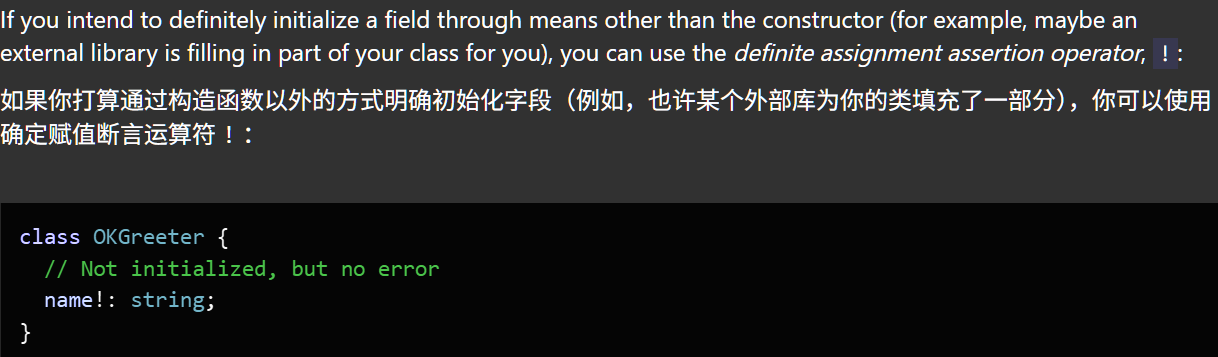
button.addEventListener("click", () => { ... });class MyComponent {
private canvasRef!: HTMLCanvasElement // 使用 ! 声明"稍后赋值"
// 字段!: 类型
// 这种写法称为 definite assignment assertion(明确赋值断言)
mounted() {
this.canvasRef = document.querySelector('#canvas')!
}
}- 场景 1:你比编译器更了解运行时状态
- 场景 2:与 DOM API 交互(已知元素存在)
- 场景 3:生命周期中延迟初始化(如 Vue/React 组件)
definite assignment assertion
9. 🤔 使用非空断言操作符 ! 有什么风险?
| 优点 | 风险 |
|---|---|
| 减少冗余检查 | 掩盖真实问题 |
| 代码简洁 | 运行时可能崩溃 |
| 适用于你 100% 确定的情况 | 破坏类型安全 |
- 不要滥用
!,用对了还好,用错了就相当于对 TS 的类型系统“撒谎”。 - 替代非空断言操作符
!的更安全做法:- 【1】优先使用类型守卫或可选链
- 【2】使用辅助函数封装安全访问
// 不推荐
const length = user.profile!.settings!.theme!.length

// 推荐
const length = user.profile?.settings?.theme?.length
if (length !== undefined) {
  // 使用 length
}function getTheme(user: User): string {
return user.profile?.settings?.theme ?? 'default'
}10. 🔗 引用
- null and undefined
- Type Manipulation - Classes --strictPropertyInitialization
- definite assignment assertion